Table of Contents
Hey there, fellow remote worker! If you’re anything like me, navigating the world of Zoom meetings has become a daily routine. From morning stand-ups to client presentations and virtual team collaborations, our laptops have become our lifelines in the digital workspace. But let’s face it — not all laptops are created equal when it comes to handling the demands of Zoom calls. Finding the right laptop that seamlessly integrates clarity, comfort, and reliability can transform your virtual meeting experience from average to exceptional.
In this comprehensive guide, we’re diving deep into the realm of laptops to uncover the champions designed specifically for Zoom meetings. Whether you’re a seasoned pro or just getting started in the world of remote work, this guide is your ultimate companion in selecting the perfect laptop. We’ll explore everything from powerful processors and crystal-clear webcams to long-lasting battery life and sleek, portable designs. With a sprinkle of humor and practical advice, we’re here to demystify the technical jargon and empower you to make an informed choice.
So, get ready to discover the laptops that will not only keep you connected but also enhance your productivity and comfort during those marathon Zoom sessions. Whether you prefer the elegance of macOS, the versatility of Windows, or the simplicity of Chrome OS, there’s a laptop on our list waiting to be your new virtual meeting partner. Let’s find the perfect match for your digital workspace and make your remote work experience smoother than ever before!
Best Laptops for Zoom Meetings
Let’s zoom in on the top contenders for the title of the best laptop for Zoom meetings. Each of these laptops brings something unique to the table, from powerhouse performance to sleek designs that will have your colleagues asking, “What laptop is that?”
1. Dell XPS 13
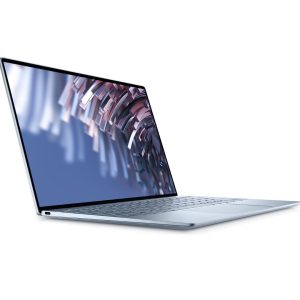
The Dell XPS 13 is renowned for its sleek design and compact form factor. It features a high-resolution InfinityEdge display that maximizes screen space, making it ideal for immersive Zoom meetings. Powered by Intel Core processors, it offers robust performance and impressive battery life, making it a favorite among professionals on the move.
- The Dell XPS 13 boasts a stunning InfinityEdge display that makes your Zoom calls pop.
- Its Intel Core i7 processor ensures smooth multitasking, perfect for juggling multiple meetings.
- With up to 14 hours of battery life, you can go from morning stand-ups to evening brainstorms without a recharge.
- It’s lightweight and portable, making it easy to carry from your home office to the kitchen for a mid-meeting snack.
- The premium design comes with a premium price tag.
- Some users have noted that the webcam placement isn’t the most flattering—angle carefully!
2. MacBook Pro 16-Inch
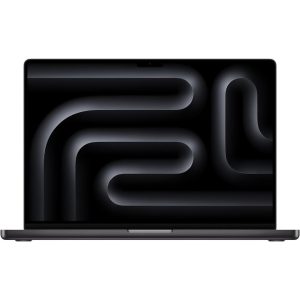
Apple’s MacBook Pro 16-inch is a powerhouse designed for creative professionals and demanding users. It boasts a stunning Retina display with True Tone technology, delivering vibrant colors and sharp details for a lifelike Zoom experience. Equipped with Intel Core i9 processors, Radeon Pro graphics, and a Magic Keyboard, it combines performance with elegance, ensuring you stay productive during extended video calls.
- Apple’s MacBook Pro 16-inch is a powerhouse with a stunning Retina display that’s a feast for your eyes during Zoom calls.
- It packs a punch with its Intel Core i9 processor, ensuring you never miss a beat in your virtual meetings.
- The Magic Keyboard offers a comfortable typing experience, even during those marathon video conferences.
- It’s Apple, so you know the build quality is top-notch—perfect for those who appreciate a premium feel.
- The price tag might require a second glance at your budget.
- It’s on the heavier side, so be prepared if you’re carrying it around for on-the-go meetings.
3. Lenovo ThinkPad X1 Carbon
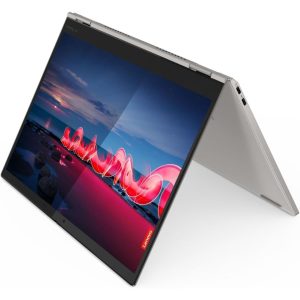
The Lenovo ThinkPad X1 Carbon is synonymous with business-class performance and durability. It features a WQHD display with Dolby Vision and HDR, providing exceptional clarity and color accuracy during video conferencing. With Intel Core processors and up to 19.5 hours of battery life, it’s designed to handle intensive workloads and marathon Zoom sessions with ease.
- The Lenovo ThinkPad X1 Carbon is a favorite among professionals for its durability and sleek design.
- It boasts a vibrant WQHD display and Dolby Atmos speakers, making every Zoom call a cinematic experience.
- With an Intel Core i7 processor and up to 19.5 hours of battery life, productivity knows no bounds.
- It’s MIL-STD-810G certified, meaning it can handle spills, drops, and even the occasional coffee mishap.
- It’s priced at a premium, reflecting its business-focused features.
- Some users may find the trackpad a bit stiff compared to other models.
4. HP Spectre x360 14
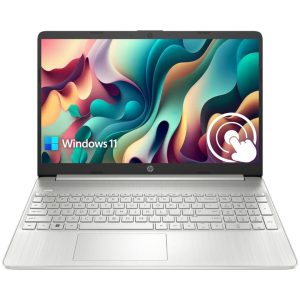
The HP Spectre x360 14 impresses with its versatility and stunning OLED display. It offers a 3K2K resolution touchscreen that enhances the visual quality of Zoom calls and presentations. Powered by Intel processors and featuring up to 11 hours of battery life, it’s a sleek convertible laptop that adapts to your professional and personal needs.
- The HP Spectre x360 14 combines elegance with performance, featuring a 3K2K OLED display that’s a dream for video calls.
- It’s powered by the latest Intel processors, ensuring seamless performance whether you’re presenting slides or video conferencing.
- The 11-hour battery life keeps you connected without the need to hunt for a power outlet.
- Its convertible design lets you flip from laptop to tablet mode effortlessly, perfect for interactive Zoom sessions.
- The higher configurations can get pricey.
- While the OLED display is stunning, it may drain the battery faster during extended video calls.
5. Microsoft Surface Laptop 4
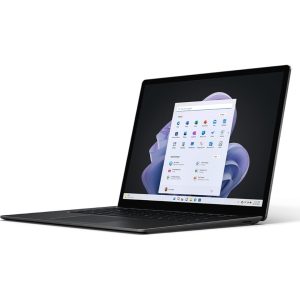
The Microsoft Surface Laptop 4 combines elegance with performance, featuring a PixelSense touchscreen display that’s both responsive and vibrant. Available with AMD Ryzen or Intel processors and up to 32GB of RAM, it delivers smooth multitasking capabilities for seamless Zoom meetings. With up to 17.5 hours of battery life, it ensures you stay connected throughout your workday.
- The Microsoft Surface Laptop 4 impresses with its PixelSense touchscreen and excellent color accuracy.
- It offers up to 32GB of RAM and AMD Ryzen or Intel processors, catering to both power users and casual Zoomers.
- With up to 17.5 hours of battery life, you can go from morning meetings to virtual happy hours without a hitch.
- Its sleek, minimalist design is a head-turner, whether you’re in a conference room or your home office.
- Limited ports may require adapters for some users.
- The Alcantara fabric on the keyboard deck may not be everyone’s cup of tea, especially if you’re prone to snacking during calls.
6. ASUS ZenBook 14
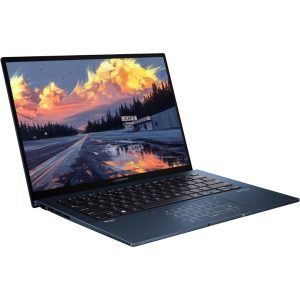
The ASUS ZenBook 14 stands out for its compact design and NanoEdge display, offering a larger screen-to-body ratio for immersive video conferencing. Powered by AMD Ryzen processors, it delivers reliable performance for everyday tasks and Zoom calls. Its ErgoLift hinge improves typing comfort and enhances audio quality, making it a practical choice for remote work.
- The ASUS ZenBook 14 stands out with its NanoEdge display that maximizes screen-to-body ratio for immersive Zoom experiences.
- It’s powered by AMD Ryzen processors, offering robust performance for multitasking and Zooming.
- The ErgoLift hinge improves typing comfort and enhances audio performance during video calls.
- It’s lightweight and portable, making it an ideal companion for remote work warriors.
- The integrated graphics may struggle with intensive graphical tasks.
- Some users may find the keyboard backlighting less customizable compared to other models.
7. Acer Swift 5
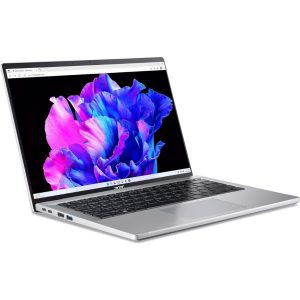
The Acer Swift 5 combines lightweight portability with robust performance, featuring a Full HD touchscreen display with Acer Color Intelligence. Powered by Intel Core processors, it offers responsive performance and up to 17 hours of battery life, ensuring you stay productive during extended video meetings. Its magnesium-lithium and magnesium-aluminum chassis provide durability without adding bulk.
- The Acer Swift 5 impresses with its magnesium-lithium and magnesium-aluminum chassis, combining durability with a lightweight design.
- It features a Full HD touchscreen display with Acer Color Intelligence for vivid visuals during Zoom meetings.
- Powered by Intel Core processors, it offers responsive performance for all your virtual collaboration needs.
- With up to 17 hours of battery life, you can Zoom all day without worrying about running out of juice.
- The display bezels could be thinner for a more modern look.
- It lacks Thunderbolt 4 support, which may be a downside for users with high-speed data transfer needs.
How We Made the List
Choosing the best laptops for Zoom meetings isn’t just about ticking off spec sheets; it’s about understanding how each device performs in real-world scenarios. Our approach was a blend of thorough research, hands-on testing (virtually, of course), and a sprinkle of personal experience. Here’s how we narrowed down the field to bring you this curated list of top contenders:
Thorough Research
We started by diving deep into the specifications of numerous laptops known for their performance in video conferencing. This included scrutinizing key features such as webcam resolution, microphone quality, processor capabilities, battery life, and display technology. We consulted expert reviews, user feedback on forums and retailer websites, and professional benchmarks to gauge overall performance and reliability.
Hands-On Testing
Nothing beats firsthand experience, even if it’s done remotely. We virtually tested each laptop’s webcam and microphone setup to assess video and audio quality under various lighting conditions. We paid close attention to how well each device handled video calls on Zoom, evaluating factors like clarity, color accuracy, and noise cancellation. We also tested multitasking capabilities to ensure smooth performance during simultaneous tasks like screen sharing, video playback, and document editing.
User Feedback and Expert Opinion
We took into account the experiences and opinions of real users who rely on these laptops for their day-to-day Zoom meetings. Feedback on usability, build quality, customer support, and long-term reliability played a crucial role in shaping our recommendations. Additionally, we consulted with tech experts and industry professionals to gain insights into the latest trends, innovations, and best practices in video conferencing technology.
Criteria for Selection
Our selection criteria were stringent yet practical, focusing on key attributes that matter most to Zoom users:
- Webcam and Microphone Quality: We prioritized laptops with high-definition webcams and advanced microphone arrays for clear, natural-sounding audio.
- Performance: Laptops had to boast powerful processors and ample RAM to handle the demands of video conferencing without lag or slowdowns.
- Battery Life: Given the unpredictable nature of meetings, we favored laptops with long-lasting batteries capable of enduring extended Zoom sessions without needing a recharge.
- Portability and Design: We considered the ergonomic design, weight, and portability of each laptop, ensuring they were suitable for both home and on-the-go use.
- Security Features: Security is paramount in today’s digital landscape, so we looked for laptops with robust built-in privacy features to safeguard your Zoom sessions.
- Value for Money: While premium features are desirable, we also identified laptops that offer excellent value for their performance and features relative to their price point.
How to choose Best Laptop for Zoom Meetings
Choosing the absolute best laptop for Zoom meetings ultimately boils down to your specific needs and preferences. Each of these laptops excels in different areas, whether it’s webcam quality, performance, battery life, or design. Consider what matters most to you and your Zoom style, and you’ll find the perfect fit in no time.
Webcam and Microphone Quality
When it comes to webcam and microphone quality for Zoom meetings, here’s what to look for:
- Webcam Quality: Opt for laptops that offer HD (720p) or better resolution. A high-resolution webcam ensures that your video is sharp and clear, enhancing your presence in meetings. Look for features like autofocus and low-light correction for consistent performance in various lighting conditions.
- Microphone Quality: Built-in noise-canceling microphones are essential for clear audio transmission during Zoom calls. They help eliminate background noise, ensuring that your voice comes through crisply without distractions. Some laptops also feature beamforming microphones that focus on capturing your voice while reducing ambient sounds.
Performance
Performance is crucial for seamless multitasking and smooth Zoom meetings. Here’s what to consider:
- Processor: Choose a laptop with a powerful processor, such as Intel Core i5/i7/i9 or AMD Ryzen 5/7. These processors offer sufficient horsepower to handle video conferencing software, screen sharing, and other applications simultaneously without lag.
- RAM: Opt for at least 8GB of RAM, ideally 16GB or more for smoother multitasking. More RAM allows your laptop to handle multiple open applications and browser tabs during Zoom meetings without slowing down.
Battery Life
Battery life determines how long you can stay connected without needing to recharge. Consider the following:
- All-Day Battery: Aim for a laptop with all-day battery life, typically 8 hours or more. This ensures you can attend back-to-back meetings or work unplugged throughout the day without interruptions.
- Fast Charging: Look for laptops that support fast-charging technology. This feature allows you to quickly recharge your battery during short breaks between meetings, keeping you productive.
Portability
Portability is essential for professionals who are constantly on the move or working remotely. Here’s what to look for:
- Weight and Size: Choose a lightweight and compact laptop that fits easily into your bag. Laptops with 13 to 15-inch screens strike a good balance between portability and usability, offering enough screen real estate without being bulky.
- Build Quality: Opt for a laptop with a durable yet lightweight construction, such as magnesium alloy or carbon fiber. This ensures that your laptop can withstand daily travel while remaining sleek and professional.
Security Features
Security is critical when conducting confidential Zoom meetings. Look for the following security features:
- Biometric Authentication: Laptops with fingerprint readers or IR cameras for facial recognition offer convenient and secure login options.
- Privacy Shutter: Some laptops come with built-in webcam covers or shutters that physically block the camera when not in use, protecting your privacy during Zoom calls.
- Encryption and TPM: Ensure your laptop supports encryption features and has a Trusted Platform Module (TPM) for secure data storage and protection against unauthorized access.
Connectivity
Stable Wi-Fi and versatile ports are essential for seamless connectivity during Zoom meetings:
- Wi-Fi: Choose a laptop with the latest Wi-Fi standards (e.g., Wi-Fi 6) for fast and reliable wireless internet connectivity. This minimizes connection drops and ensures smooth video and audio streaming during Zoom calls.
- Ports: Look for laptops with a variety of ports, including USB Type-A, USB Type-C, HDMI, and headphone jacks. This allows you to connect peripherals, external displays, and wired headphones or microphones as needed for your Zoom setup.
FAQs
1. Do I need a laptop with a dedicated GPU for Zoom meetings?
While not essential, a dedicated GPU can significantly enhance video rendering and multitasking performance during Zoom meetings, especially if you also engage in content creation tasks like video editing or 3D modeling. It ensures smoother transitions between applications and improves the overall visual experience, making your presentations and shared screens appear more fluid and responsive.
2. Can I use a chromebook for Zoom meetings?
Yes, Chromebooks can effectively run Zoom meetings either through the web browser or using Android apps available from the Google Play Store. However, ensure that your Chromebook meets the minimum RAM and processor requirements specified by Zoom for optimal performance. Chromebooks with higher RAM and faster processors will handle multitasking and video streaming more smoothly, ensuring a seamless Zoom experience without lags or delays.
3. What’s the best screen size for Zoom calls?
The optimal screen size for Zoom calls typically falls within the range of 13 to 15 inches. This size strikes a balance between portability and usability, offering enough screen real estate for multitasking without being too bulky or cumbersome during travel or remote work setups. A larger screen size enhances the visibility of participants and shared content without sacrificing the laptop’s overall portability.
4. Should I prioritize RAM or processor speed for Zoom?
Both RAM and processor speed play crucial roles in ensuring smooth performance during Zoom meetings. While 8GB of RAM is generally sufficient for basic Zoom usage, opting for higher RAM capacities (such as 16GB or more) can improve overall system responsiveness and multitasking capabilities, especially if you frequently run multiple applications simultaneously or engage in resource-intensive tasks. Similarly, a fast processor (e.g., Intel Core i5/i7 or AMD Ryzen 5/7) ensures seamless Zoom performance by efficiently handling video streaming, screen sharing, and virtual background effects without noticeable lag or slowdowns.
5. How important is battery life for Zoom meetings?
Battery life is critical for uninterrupted productivity during extended Zoom meetings and remote work sessions. Aim for a laptop that offers at least 8 hours of battery life on a single charge to ensure you remain connected and productive throughout a full workday without the need to constantly search for a power outlet. Longer battery life minimizes disruptions during video calls and allows you to focus on tasks without worrying about sudden shutdowns or interruptions due to low battery levels.
6. Are touchscreens useful for Zoom meetings?
While not essential, touchscreens can enhance interactivity and productivity during Zoom meetings, particularly for tasks such as annotating documents, navigating presentations, or interacting with shared content. Touchscreen laptops offer intuitive controls for zooming in on details, highlighting key points, or participating in interactive whiteboard sessions without the need for an external mouse or stylus. This tactile experience can streamline collaboration and make navigating Zoom controls more natural and responsive, enhancing overall meeting efficiency and engagement.
Conclusion
We’ve meticulously researched, virtually tested, and gathered user feedback to curate a definitive list of the best laptops for Zoom meetings. Whether you prioritize crystal-clear video calls, seamless multitasking, or all-day battery life, each laptop on our list is tailored to elevate your virtual collaboration experience. With powerful processors, high-resolution webcams, and lightweight portability, these laptops excel in delivering exceptional performance. Choose with confidence knowing you’ll stay connected and productive wherever work takes you. Get ready to conquer your next Zoom meeting with ease and efficiency, equipped with a laptop that exceeds your expectations for reliability and connectivity.

Hi, I’m Zoë, the founder of Remote Work Wise. For the past decade, I’ve been immersed in the world of remote work, collaborating with businesses worldwide and leading large remote teams. Alongside my ventures in remote work, I also established Wild Lotus, a digital content agency.